How to Trade Tokenized Stocks, Gold and Indices Onchain
Canborsa Team

Earnings season is the busiest stretch of the year for stock traders, and onchain markets now let you trade it from a crypto wallet, at any hour, long or short. This guide explains how tokenized stocks, gold and indices work on Canborsa and how to approach the reports and macro events coming up in the next two weeks.
What you can trade
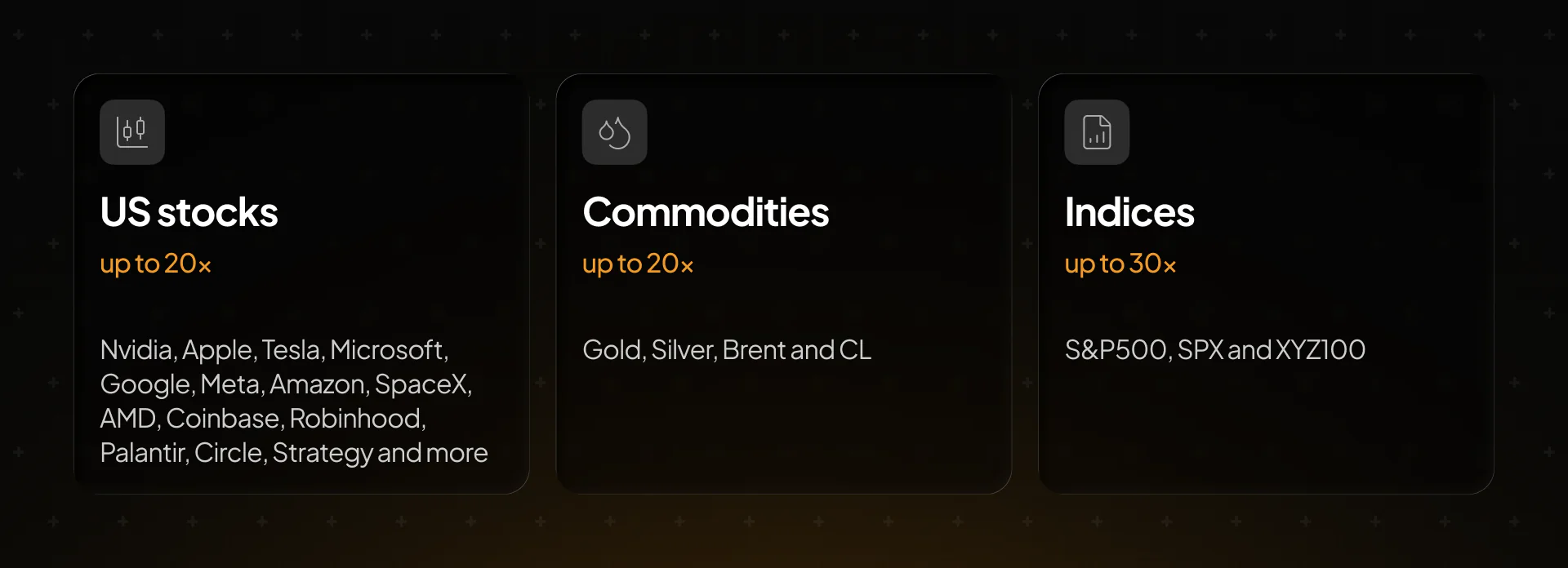
Canborsa lists three groups of real-world assets next to crypto, all in one account and one balance.
There are two ways to get exposure to these assets.
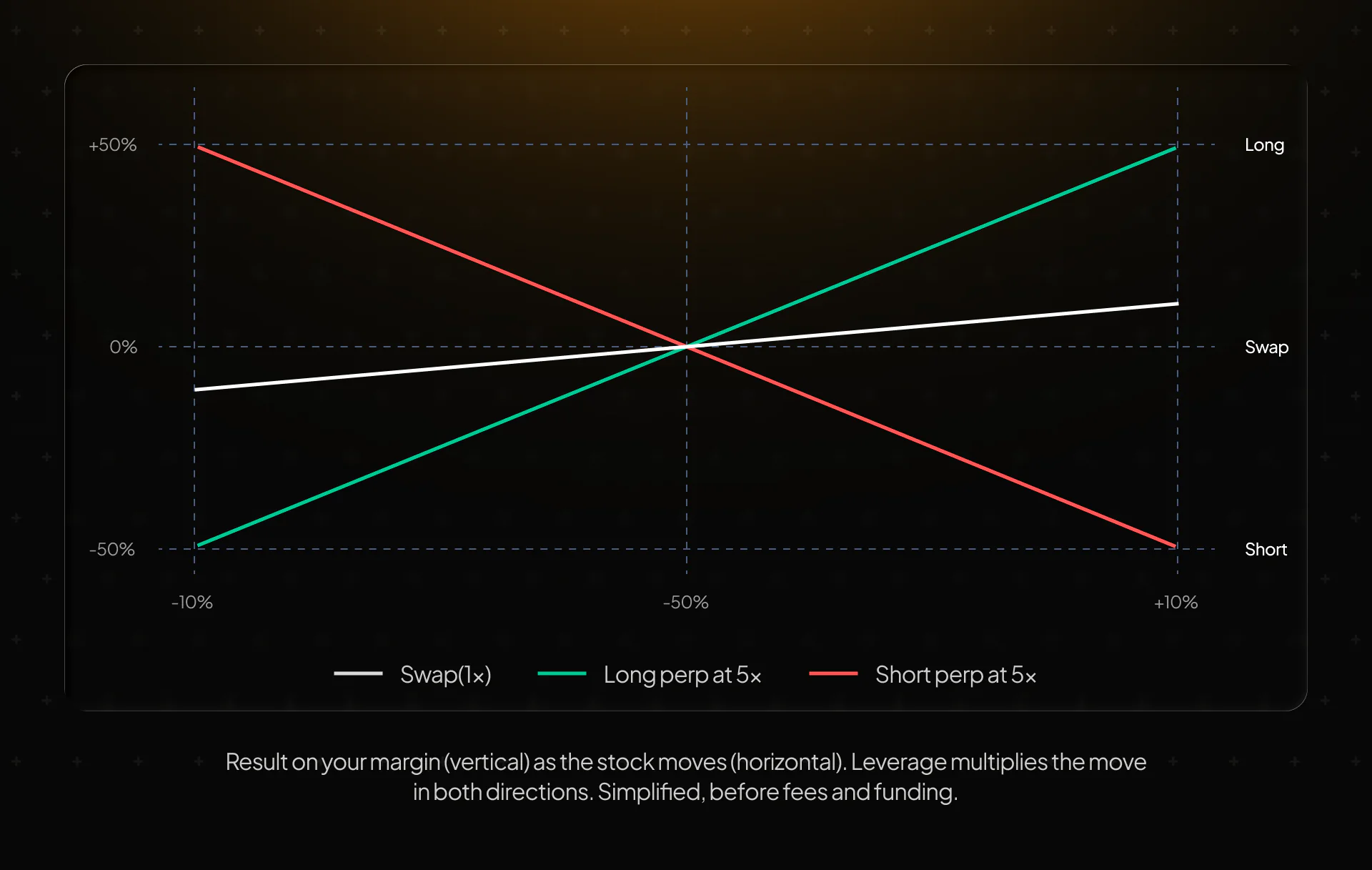
Swap lets you hold the asset itself. You exchange a stablecoin for a tokenized stock such as AAPLX or NVDAX, or for tokenized gold (XAUT), and keep it in your wallet. Your result follows the price one to one, with no leverage and no liquidation.
Perpetuals let you trade the price with leverage, in either direction. You go long if you expect the price to rise or short if you expect it to fall. A perpetual has no expiry date, so you hold the position until you close it or it is liquidated. During earnings season most active traders use perpetuals, because a report can move a stock sharply up or down, and a short lets you trade a disappointing result too.
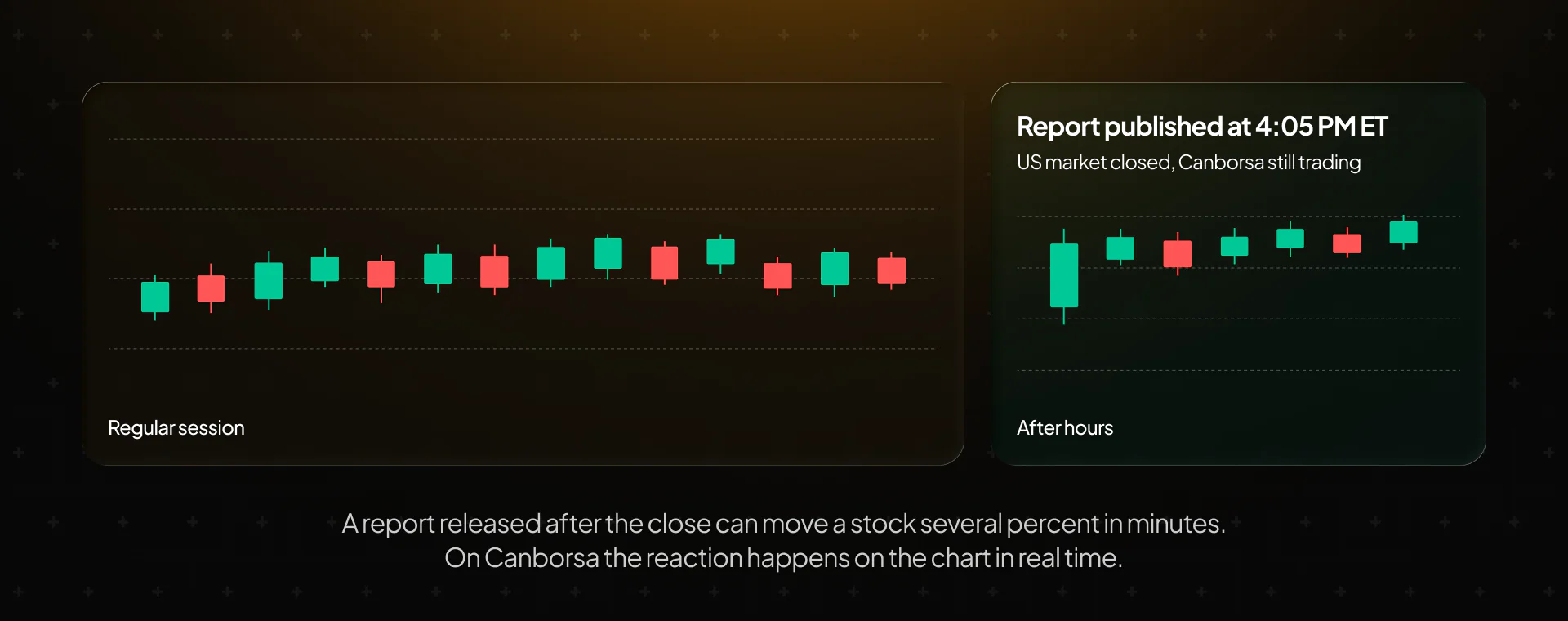
Both stay open 24/7. The underlying US exchanges close at 4:00 PM ET and on weekends, but the Canborsa markets keep trading, which matters most on report days.
Why earnings season matters
Four times a year, public companies report their revenue, profit and outlook for the next quarter. These reports are among the biggest single-day price drivers in the stock market, because they replace months of guessing with hard numbers.
Most large US companies publish results after the market closes at 4:00 PM ET. On a traditional brokerage, that leaves you two choices. You either hold your position into the report and hope, or you wait until the next morning and trade after the price has already jumped. The move between the close and the next open is called a gap, and it can be several percent for a single stock.
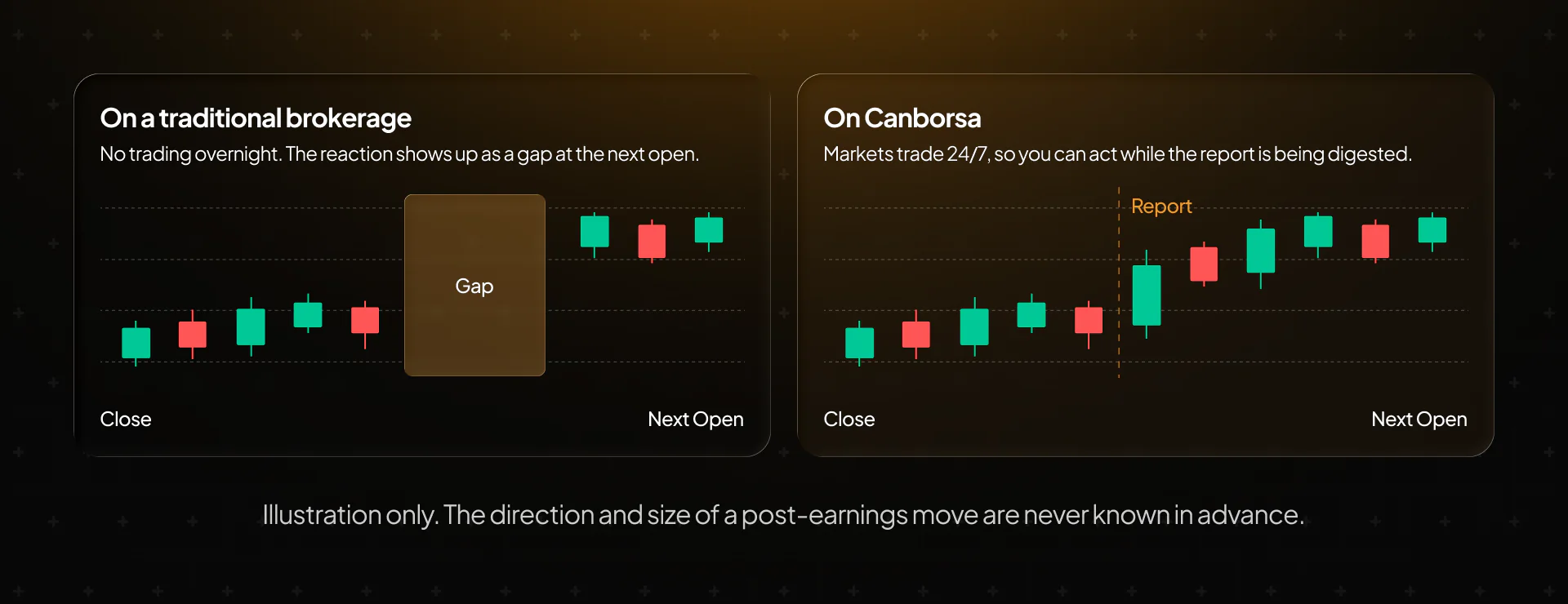
Onchain perpetuals change that. Because Canborsa markets trade around the clock, the price of a tokenized stock starts reacting the moment the report is out. You can watch the numbers, read the guidance and open or close a position while the regular exchange is closed.
The flip side is that the sharp moves are real here too. A stock can drop 10% in minutes after a weak outlook, and with leverage that move is multiplied. Earnings season rewards preparation more than speed, which is what the next section covers.
How to prepare an earnings trade
A good earnings trade is planned before the report comes out. Here is a simple routine that builds on our guides to fundamental analysis, technical analysis and candlestick charts.
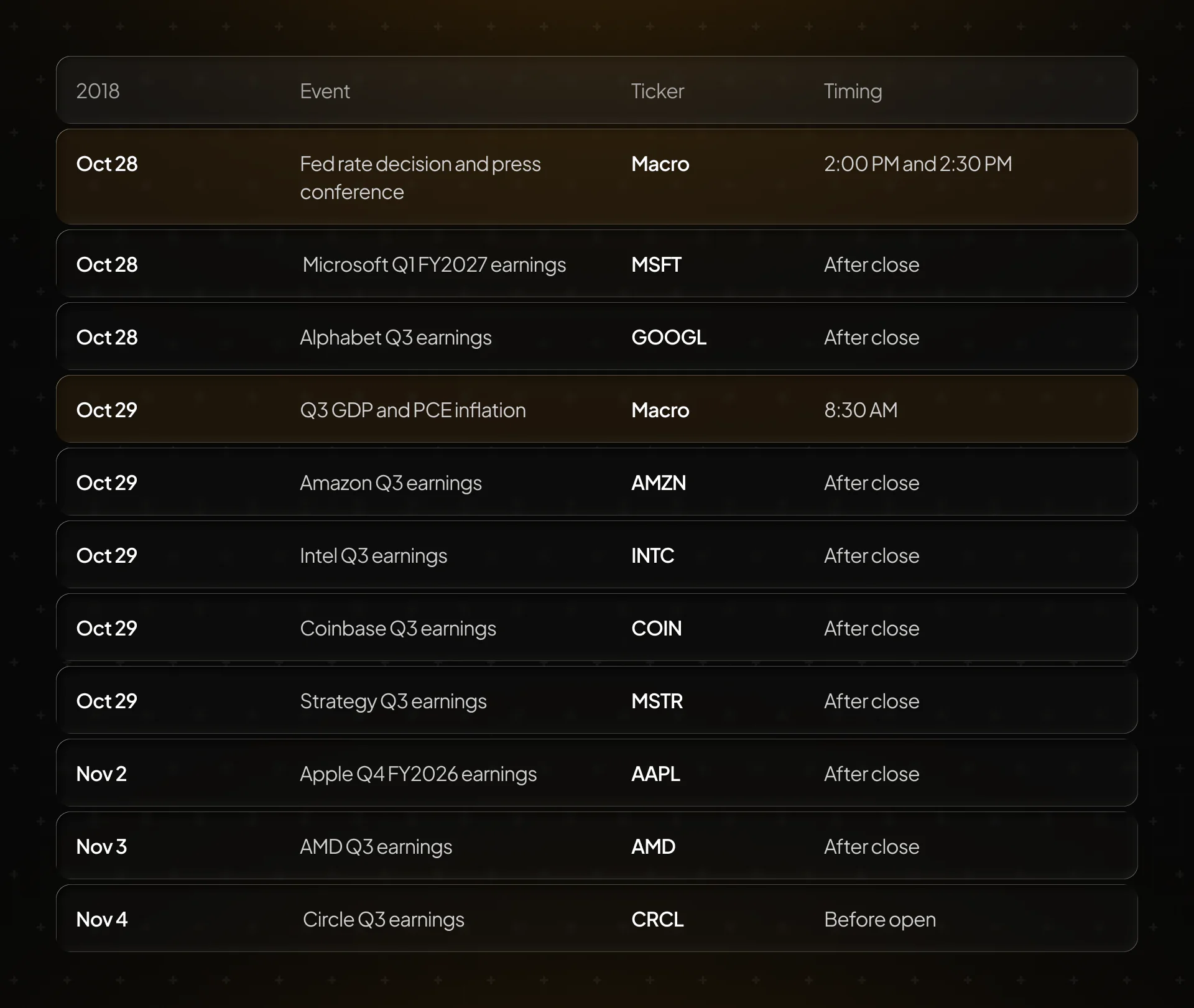
- Know the date and time. Check when the company reports and whether it is before the open or after the close. The calendar at the end of this guide lists the reports for the next two weeks.
- Compare results with expectations. The market compares the numbers with what analysts expected. A company can grow revenue by 20% and still fall if traders expected 25%. Search for the consensus estimate for revenue and earnings per share before the report.
- Watch the guidance. The outlook for the next quarter often moves the price more than the past quarter. Comments on AI spending, demand or margins can matter more than the headline numbers.
- Mark your levels. Use the chart to find recent highs, lows and support and resistance zones. These are the areas where a post-earnings move often pauses or reverses.
- Decide your plan in advance. Either you hold a position into the report, accepting the risk of a gap, or you wait for the numbers and trade the reaction. Both are valid. Mixing them on the spot usually leads to emotional decisions.
- Size the position for the worst case. Ask yourself what happens if the stock moves 10% against you. Choose leverage and margin so that this outcome does not wipe out your account.
The same logic applies to companies that move crypto prices. Coinbase, Robinhood, Circle and Strategy all report this season, and their results often affect sentiment around Bitcoin and the wider market.
Gold and indices around macro events
Earnings drive single stocks. Gold, oil and indices react more to the economy as a whole, and the next two weeks are packed with macro data.
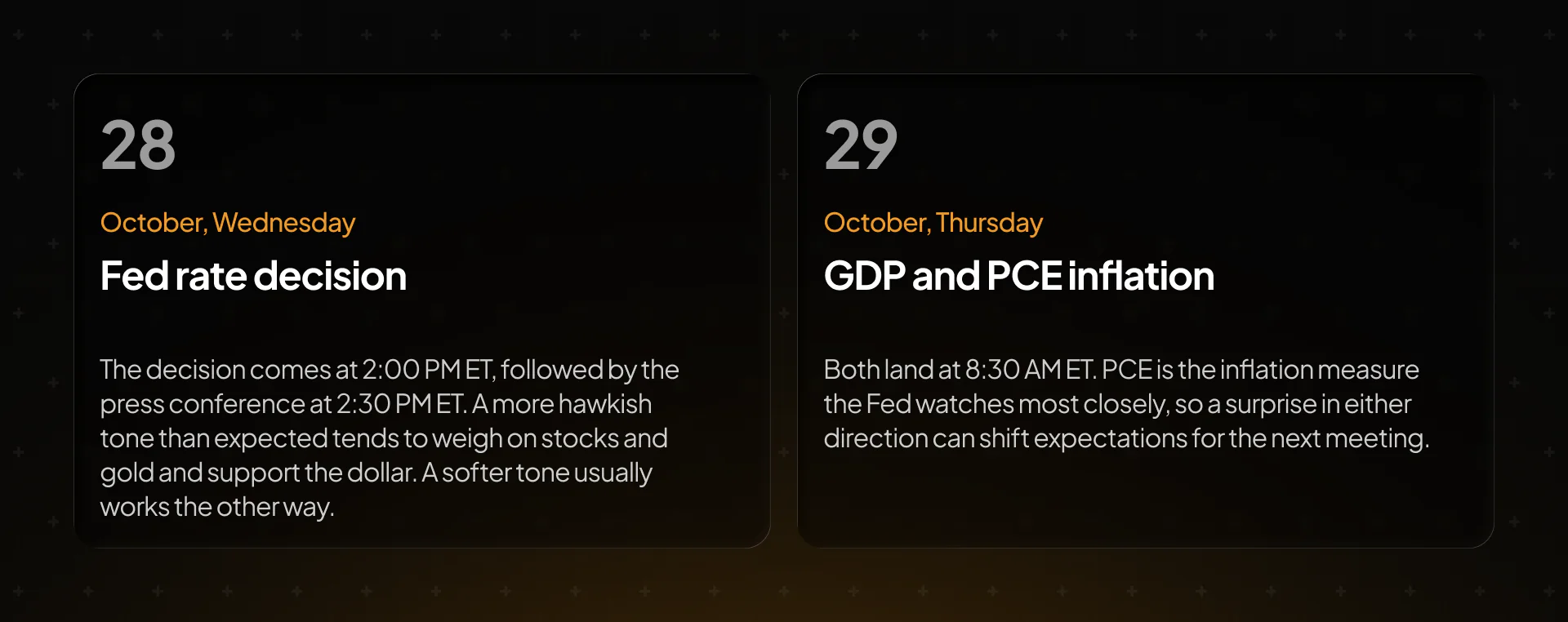
Here is how each market typically connects to these events.
Gold reacts to interest rates, the dollar and demand for safe-haven assets. Lower expected rates and a weaker dollar usually support it.
Oil moves on supply, inventories and geopolitics more than on single data releases, but a weaker growth outlook can pull it lower.
The S&P 500 and XYZ100 reflect both the Fed and the earnings of the largest companies. Microsoft, Google, Amazon and Apple make up a large share of these indices, so their reports move the whole market.
Indices are also a way to trade the season without picking a single company. If you have a view on the overall reaction to Big Tech earnings and the Fed, one position on the S&P 500 or XYZ100 expresses it.
Step by step on Canborsa
Here is how to open a position on a tokenized stock, using Microsoft ahead of its October 28 report as an example.
- Go to app.canborsa.com and sign in with your email, your X account or a wallet.
- Deposit USDT, USDC, USDG, USDCx or CC through any of the six supported networks (Canton, Ethereum, BNB Chain, Base, Arbitrum or Robinhood Chain).
- Open Trade and pick the pair, for example MSFT/USDT.
- Choose Long if you expect the price to rise or Short if you expect it to fall.
- Choose Market to enter at the current price or Limit to set your own entry.
- Select the collateral, the pair's stablecoin or CC.
- Enter the margin and set the leverage. Position size equals margin times leverage, so $200 of margin at 5x opens a $1,000 position.
- Set Take Profit and Stop Loss if you want the position to close automatically at your target or your limit.
- Check the fee and the liquidation price in the order form, then confirm.
Once the position is open, you can change Take Profit and Stop Loss at any time or close part of the position, 25%, 50%, 75% or a custom amount. That is useful after a strong post-earnings move, when you want to lock in part of the result and keep the rest running.
A few practical details. You can hold one position per pair and collateral, and opening the same pair again adds to it. The minimum order on most pairs is $15. Every closed trade, including fees and funding, appears in P&L Analysis, which makes it easy to review how your earnings trades performed.
Earnings and macro calendar for the next two weeks
Times are US Eastern. After close means after 4:00 PM ET, before open means before 9:30 AM ET.